
Share this post
How to build an entity structure chart for tax clients
A family office client with a holding partnership and a dynasty trust can mean seven returns at one firm, each waiting on another entity's K-1. The map of who owns what often lives on a whiteboard, in an old org chart PDF or in a partner's head. So each team works from its own slice of the family, and it's hard to see when one late K-1 is holding up six returns.
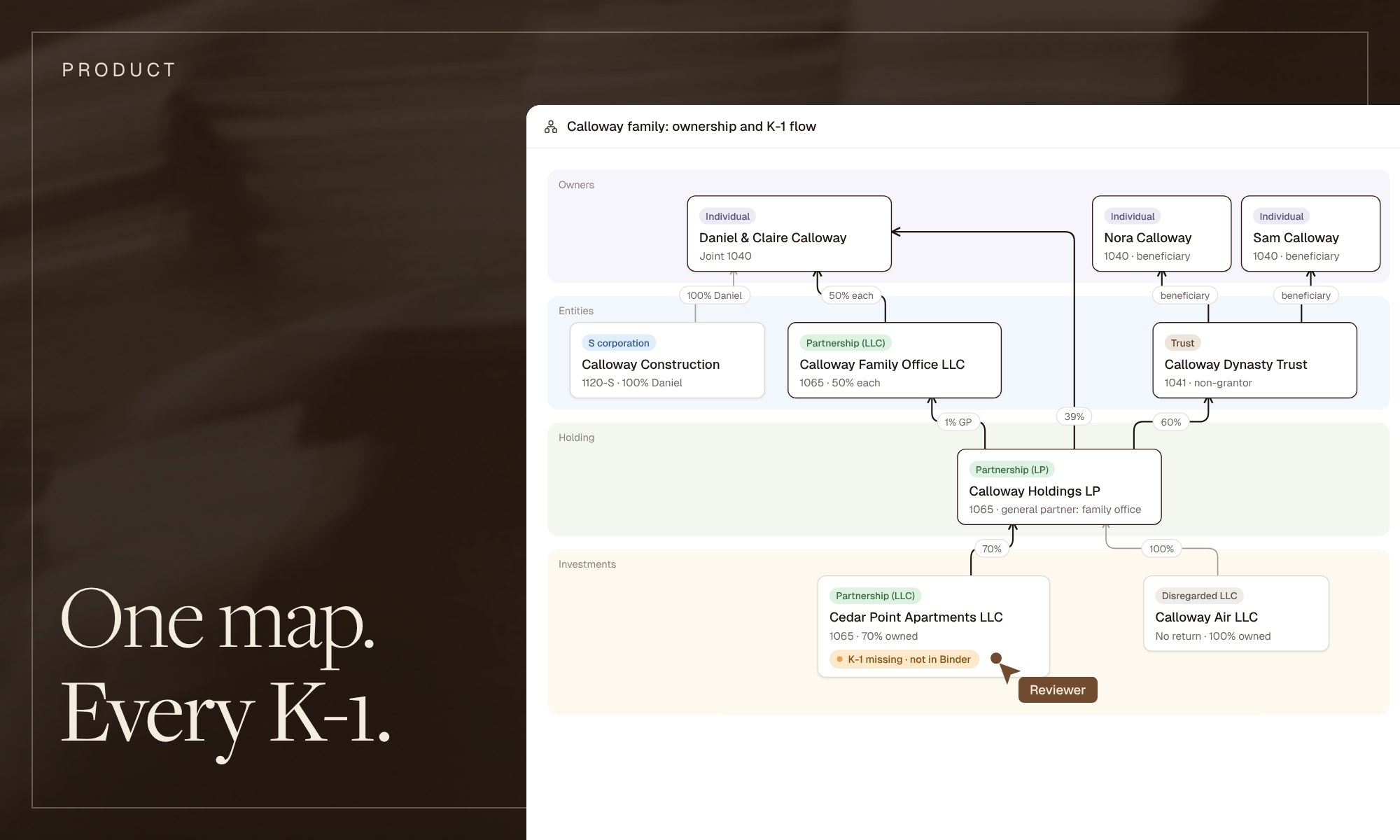
An entity structure chart puts the whole family on one page: every entity, who owns what percentage, which return it files and where each K-1 goes. The chat in Filed now draws that chart from the documents in the client's Binder, shows which K-1s are still missing and lets you save it to the client's documents.
What goes on an entity structure chart for tax?
Five things, drawn in tiers from the owners at the top to the investments at the bottom.
- Owners. The individuals and couples at the top, with the return each one files, such as a joint 1040.
- Entities. One box per entity, labeled with its type and its return: 1120-S, 1065, 1041, or none for a disregarded entity.
- Ownership lines. A line from each owner to each entity, with the percentage on it.
- K-1 flows. Which entity issues a K-1 to whom, so you can read the order the returns have to be finished in.
- What's still missing. Which K-1s are in the Binder and which aren't, so the chart doubles as a K-1 tracker.
Corporate legal teams draw the same kind of chart for their subsidiaries. For a tax firm, the last two items are what matter most: the K-1s, and the returns that wait on them.
What does one family's structure look like?
Take a hypothetical family, the Calloways: seven returns at one firm, with a K-1 three tiers away from the individual returns.
Daniel Calloway built a construction company from one pickup truck. Over twenty years, one company turned into a family of entities:
- Daniel and Claire file a joint 1040.
- Daniel owns 100% of Calloway Construction, an S corporation that files Form 1120-S.
- Daniel and Claire own Calloway Family Office LLC 50/50. It files Form 1065 and is the 1% general partner of Calloway Holdings LP.
- Daniel and Claire hold 39% of Calloway Holdings directly.
- The Calloway Dynasty Trust, a non-grantor trust that files Form 1041, holds the other 60%. Its beneficiaries are the couple's children, Nora and Sam, who each file a 1040.
- Calloway Holdings files Form 1065. It owns 70% of Cedar Point Apartments LLC, alongside outside investors, and 100% of Calloway Air LLC, a disregarded entity that holds the family plane.
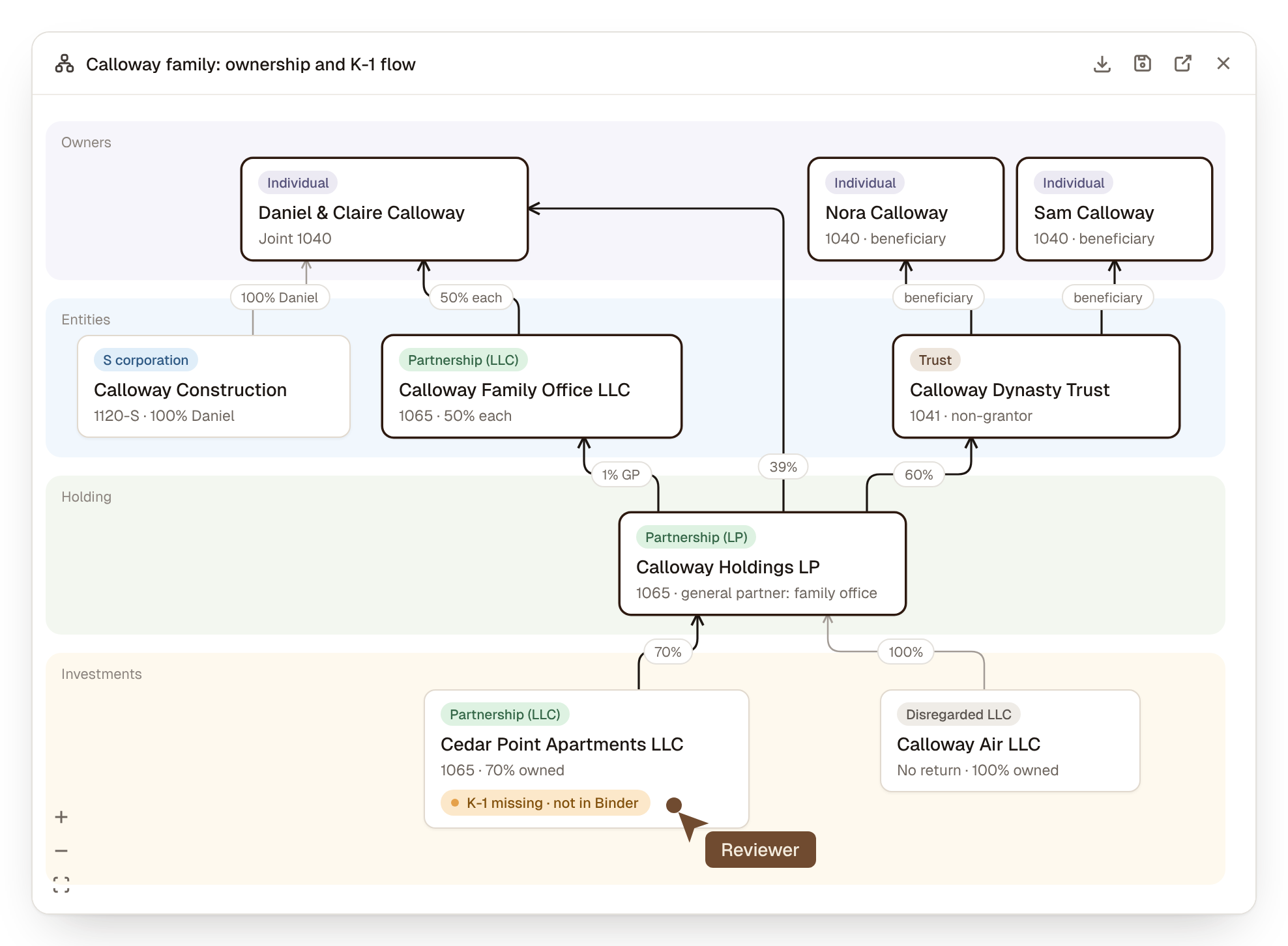
The Calloways are a hypothetical family. Outlined boxes are the six returns waiting on the Cedar Point K-1, which is not in the Binder yet. Cedar Point's outside investors are left off the map.
The firm prepares seven returns: the joint 1040, the 1120-S, the family office's 1065, the trust's 1041, Calloway Holdings' 1065, and Nora's and Sam's 1040s. Cedar Point's return is prepared elsewhere, and the firm receives its K-1. Calloway Air files no income tax return of its own, because its activity is reported on the Holdings return.
How does the chat in Filed draw a client's structure?
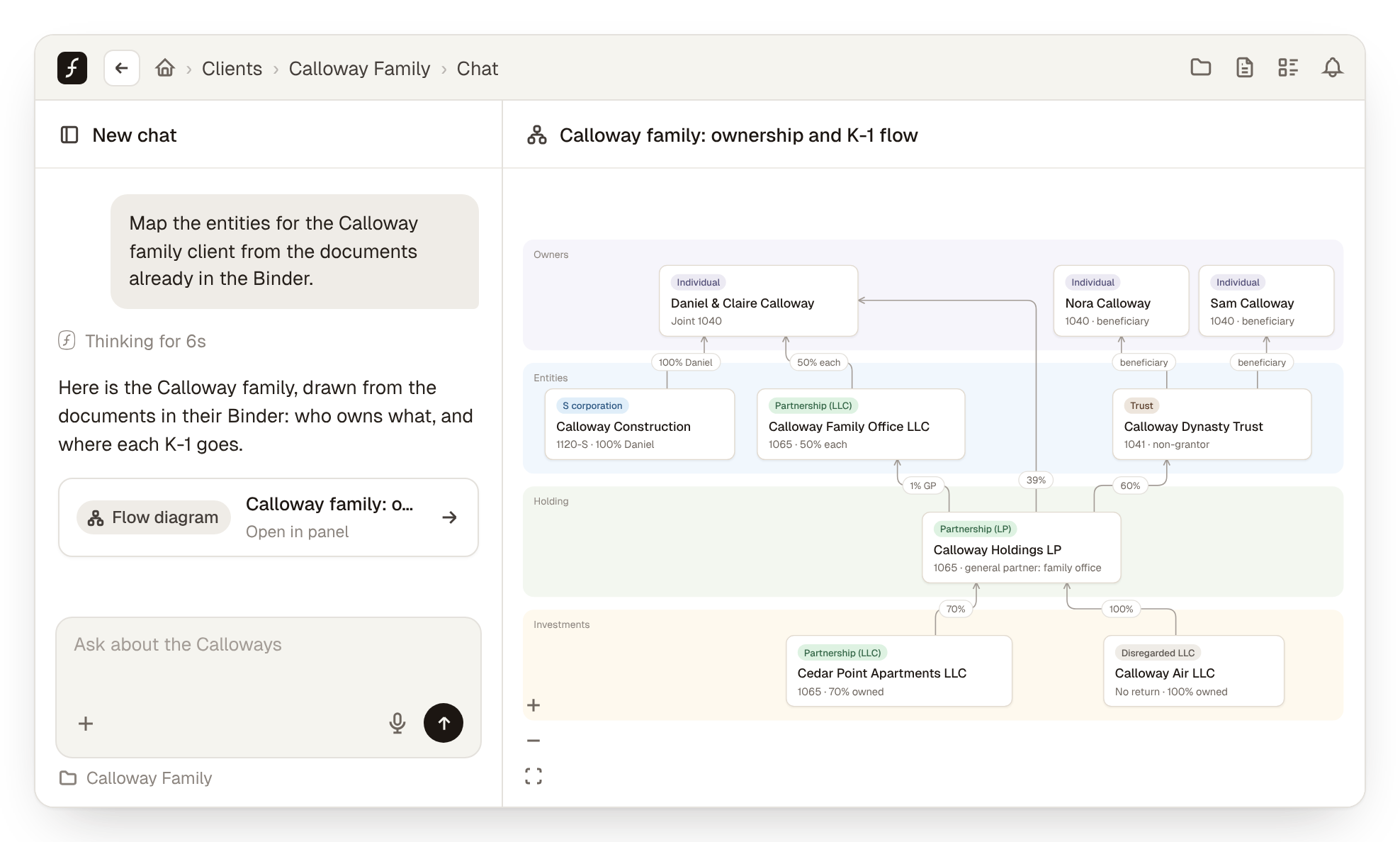
You ask, and the chat in Filed draws the structure as a flow diagram from the documents already in the client's Binder. It is the entity structure chart many firms still sketch on a whiteboard, built from the source documents instead of from memory.
- Ask for the map. Open the client's chat and type something like: "Map the entities for the Calloway family client from the documents already in the Binder." The chat reads the documents in the Binder and tells you which client it read.
- Read the diagram. Each entity is a box labeled with its type. The lines show who owns what, by what percentage, and where each K-1 goes.
- Open it full size. Expand the diagram into the side panel to pan, zoom and drag boxes where you want them.
- Tell it what changed. Type the change in plain words, such as "Claire moved 10% of Calloway Holdings into the Claire Calloway GRAT. Update the diagram." The chat redraws the structure.
- Ask what's missing. Ask "Which K-1s are we still waiting on for the Calloways?" The chat checks each K-1 against the Binder and marks it as in the Binder or missing.
- Save or export it. Save the diagram to the client's documents in Filed, or download it as an image for the next family meeting.
No documents in the Binder yet? Type the structure into the chat in a sentence or two, and it draws from your description.
The chat draws what the documents and your instructions say. A preparer still confirms the percentages, each trust's tax status and anything the documents don't show. The diagram makes the structure quick to check, and the judgment stays with the tax pro.
Why does one missing K-1 hold up six returns?
Because the K-1 travels up three tiers, and every return on the way needs it.
Cedar Point's K-1 goes to Calloway Holdings, which issues K-1s to the trust, the family office, and Daniel and Claire. The family office then issues K-1s to Daniel and Claire, and the trust to Nora and Sam. Until Cedar Point's K-1 arrives, six of the seven returns wait, and only Calloway Construction can be finished.
In separate binders, the trust team chases a K-1 from Calloway Holdings and Nora's preparer chases one from the trust. Neither binder shows that both are waiting on the same apartment partnership.
The GRAT from step 4 doesn't change that count. A grantor retained annuity trust (GRAT) is generally a grantor trust, so its income lands on Daniel and Claire's joint 1040. The diagram gets a new box, and six returns still wait on Cedar Point.
Why do family offices and multi-entity clients make binders drift further apart?
Because their returns depend on each other, and the dependencies run between binders that different teams own.
Late K-1s are common. A partnership has until its return's due date to get Schedule K-1 to each partner, and a Form 7004 extension moves that date from March 15 to September 15 for a calendar-year partnership. Each tier waits on the one below it.
Ownership changes add more drift. When part of a partnership interest moves into a trust, every binder that shows that partnership needs the new percentages, and a team that didn't hear about it finds out at review.
What makes tax binders inconsistent from team to team?
Six things, and most of them come from building each binder by hand, a little differently each time.
- No single index. Each office or team keeps its own folder order, so a reviewer who moves between teams relearns where the K-1s live.
- Files named by whoever scanned them. The same W-2 is scan_0412.pdf in one binder and "Wages" in another.
- Different ideas of complete. One team checks against last year's return, another against the organizer, so gaps surface at different stages.
- Last year rolled forward unchecked. Old ownership percentages and K-1 sources carry over after the structure changes.
- Different sign-off levels. Some teams sign off at three levels, others at one, and the binders look the same from outside.
- No shared map of the client's entities. Each team sees only the slice of the family its own return touches.
The IRS asks the same of its own examiners: the Internal Revenue Manual says workpapers must be legible, indexed and organized.
The Binder inside Filed takes care of most of the first five: one return order, documents named by payer and account, an expected list built from last year, and every sign-off recorded with a name and time. The sixth is the entity map, which the chat in Filed now draws.
How do you standardize tax binders across teams?
Agree on one way to build a binder, then let software do the building so the agreement still holds in March.
- Use one index for every binder, in return order: income, deductions, payments.
- Name documents by form and issuer, never by scan.
- Build the expected-documents list from last year's return, so every team checks against the same list.
- Keep one structure map per family, saved with the client's documents and redrawn when ownership changes.
- Track K-1 dependencies, so a missing K-1 shows every return waiting on it.
- Set sign-off levels once, firm-wide, and record who signed off and when.
The Binder inside Filed handles the first three and lets the firm set sign-off levels once. The chat in Filed covers the map and the K-1 dependencies, and a map saved to the client's documents is next year's starting point. For questions across all your clients, such as who is still missing K-1s, ask Analyst, Filed's firm-wide chat.
Filed works with CCH Axcess, Lacerte, Drake and ProConnect, for 1040, 1065, 1120, 1120-S, 1041 and 990 returns. Related reading: how to automate tax workpapers with AI and how tax firms process K-1s.
Frequently asked questions
What is an entity structure chart, and why do tax preparers need one?
An entity structure chart, or entity diagram, shows who owns which entity, by what percentage, and which return each one files. For tax work it also shows where each K-1 comes from and where it goes, so the team can see which returns depend on which. Firms need one most for family offices, partnership structures and dynasty trusts, where several returns wait on each other's K-1s.
Can you build an entity structure chart in a slide deck or a diagramming tool?
Yes, and many firms do. The catch is that someone draws it by hand, often from memory, and it goes stale when ownership changes. A chart drawn from the client's documents, and redrawn when you tell the chat what changed, is easier to keep current.
Why do K-1s from tiered partnerships arrive so late?
A partnership has until its return's due date, including extensions, to furnish K-1s. For a calendar-year partnership on extension, that is September 15. An upper-tier partnership needs its lower tiers' K-1s before it can finish, so the wait stacks up at each tier.
Can Filed draw an entity diagram from a client's documents?
Yes. The chat in Filed draws a flow diagram of a client's entities, ownership percentages and K-1s from the documents in the client's Binder, or from a structure you type in. You can tell it about changes, ask which K-1s are missing, and save the diagram to the client's documents or download it as an image.
Does the diagram replace the preparer's review of the structure?
No. The chat draws what the documents say, and a preparer confirms the percentages, each trust's status and anything the documents don't show. The diagram makes the structure easy to check. The judgment stays with the tax pro.
Where to start
Pick your most complex family office or multi-entity client, the one that lives on a whiteboard today. Open its chat, ask it to map the entities from the Binder, and check the diagram against what your team knows. Then ask which K-1s you're still waiting on. To try it on your own clients, book a demo.
Subscribe to our newsletter
Explore our latest insights
Discover valuable articles to enhance your knowledge.