
Share this post
Professional tax software for CPA firms: how to choose
The right professional tax software for a CPA firm is the package that fits its return mix, volume and workflow, not the one with the longest feature list. This guide compares six established packages: CCH Axcess Tax, UltraTax CS, Lacerte, Drake Tax, ProConnect Tax and GoSystem Tax RS. Weigh them on return mix, deployment, integrations, staff familiarity and total cost including conversion, then test the finalists on last season's returns.
It is written for firms filing roughly 2,000 to 10,000 returns a year, and it doesn't crown a winner, because a firm that is mostly 1040s and a firm filing consolidated corporate returns need different things. Filed doesn't sell tax software. It works on top of all six, which is why these six are the ones covered here.
What professional tax software do CPA firms actually use?
The Tax Adviser and the Journal of Accountancy run an annual survey that answers this directly. In the 2026 tax software survey, 1,808 AICPA members who prepared 2025 returns for a fee named their software and rated it after busy season. Its ratings cover the seven most-used packages.
- Four of the six are among the seven most-used packages. UltraTax CS was named by 22.3% of respondents, Lacerte by 16.7%, Drake Tax by 14.3% and CCH Axcess Tax by 13.8%. ProConnect Tax reached 4.4%. GoSystem Tax RS, which Thomson Reuters positions for complex returns, was named by fewer than 1%.
- Firm size shapes the market. UltraTax CS was used by 30.5% of respondents at firms with more than 500 preparers, although those firms made up only 8.9% of its users. At the other end, 46.5% of Drake Tax users were sole practitioners.
- Overall ratings sit in a narrow band. On a five-point scale, the seven packages averaged between 4.0 and 4.4 overall, with Drake Tax and Lacerte at the top. Price is the clearest split. The survey calls it "a sore spot for most users of most products," yet 86% of Drake Tax users named price as a top like, more than any trait for any product.
- Getting data in drew the most dissatisfaction. Importing data and integration with other software were the weakest areas across the board. The average for importing data was 3.4 out of 5, and UltraTax CS led both measures, at 3.5 for importing and 3.4 for integration.
How do these six professional tax software packages compare?
The six split along two lines: where the software runs (in the cloud, or installed on your own machines with optional hosting) and what kind of work each vendor builds it for. The table uses each vendor's own positioning; the notes below it are questions to ask in a demo.
| Software | Deployment | Vendor positions it for | Worth checking |
|---|---|---|---|
| CCH Axcess Tax | Cloud | Firms of all sizes that want tax, workflow and documents on one platform | Package tier and modules you need, pricing by quote |
| UltraTax CS | Local or network install, or Thomson Reuters hosting | End-to-end tax compliance inside the CS Professional Suite | How much of the CS suite you use, hosting choice, custom pricing |
| Lacerte | Desktop, with optional hosting powered by Rightworks | Complex returns and multiple preparers | Hosting and concurrent-user costs, bundles versus pay-per-return |
| Drake Tax | Windows desktop, hosting, or Drake Tax Online in the browser | Complex, high-volume firms (Pro) and 1040-focused preparers (1040) | Pro versus 1040 package, per-site and per-EFIN licensing |
| ProConnect Tax | Cloud, nothing to download | Firms that want books, tax and advisory in one Intuit platform | Bundle versus pay-per-return pricing at your volume |
| GoSystem Tax RS | Cloud-native | Complex returns, including multitiered consolidated and multistate filings | Coverage for every return type you file, pricing through a sales rep |
CCH Axcess Tax
Wolters Kluwer describes CCH Axcess Tax as developed specifically for the cloud and suitable for firms of all sizes. It connects to other CCH Axcess modules, such as Workflow and Document, and to third-party tools through what Wolters Kluwer calls cloud-based open integration. Packages are tiered by firm size and priced by quote. In the survey, 92.3% of its users said they run it in the cloud and 85.9% said it had every form they needed. What to check: price the package tier and the modules you will actually use, not just the tax engine, and ask what implementation and training are included.
UltraTax CS
UltraTax CS is part of Thomson Reuters' CS Professional Suite. It runs from a local or network drive, or in Thomson Reuters' hosted Virtual Office CS and SaaS environments. It shares data with Accounting CS, Practice CS and the rest of the suite, and uses tax ID numbers to link 1065, 1120-S and 1041 returns to the related 1040s. Thomson Reuters lists 1040, 1065, 1120, 1120-S, 1041 and 990 returns, plus more than 371 state and local e-file returns, and sets custom pricing by users, returns, and states and jurisdictions. In the survey, 92.1% of its users said it had every form they needed. What to check: Thomson Reuters says firms report over 50% time savings from CS Professional Suite data integration, so weigh how much of the suite you run or would add.
Lacerte
Intuit positions Lacerte for complex returns and multiple preparers. It installs as desktop software, and Intuit sells hosting powered by Rightworks as a monthly add-on subscription. Intuit lists more than 7,200 tax forms and 25,000 automated diagnostics, and sells Lacerte as return bundles or pay-per-return. What to check: Intuit's terms require Fast Path services for several people working at once in hosted Lacerte, and an annual Fast Path license for pay-per-return, so price both in.
Drake Tax
Drake Tax is natively a Windows application, with hosting options and a browser-based version, Drake Tax Online. Drake publishes its prices. It positions Drake Tax Pro, which includes 1120, 1120-S, 1065, 1041 and 990 returns alongside the 1040, for complex, high-volume firms, and Drake Tax 1040 for 1040-focused preparers. In the survey, Drake Tax had the top scores for technical support. What to check: desktop licensing is per physical site and EFIN, which matters for multi-office firms, and Drake notes that Drake Tax Online differs from the desktop version in some features.
ProConnect Tax
ProConnect Tax is Intuit's cloud package, with nothing to download, and it powers the Tax Prep tool in Intuit Accountant Suite. It brings QuickBooks data into returns, lets several preparers work in the same return at once, and requests IRS transcripts without leaving the software. Intuit publishes bundle and pay-per-return prices and also offers custom pricing. What to check: run last season's return count through both pricing models, because which one costs less depends on volume.
GoSystem Tax RS
GoSystem Tax RS is Thomson Reuters' cloud-native package for complex returns. Several people can work in the same file at once, and it handles multitiered consolidated corporate returns, multistate filings and specialized returns such as life insurance and tax equalization returns. Thomson Reuters says it handles simple returns as well, and describes extensive API capabilities and a link to its FirmFlow workflow tool. What to check: its product page names 1040, 1120, 1065 and 1041 returns, so confirm coverage for every other return type you file, such as 1120-S and 990.
How should a firm choose professional tax preparation software?
Start from the client book, not the demo. Five questions narrow six packages to two or three, and a test on last season's returns picks between them.
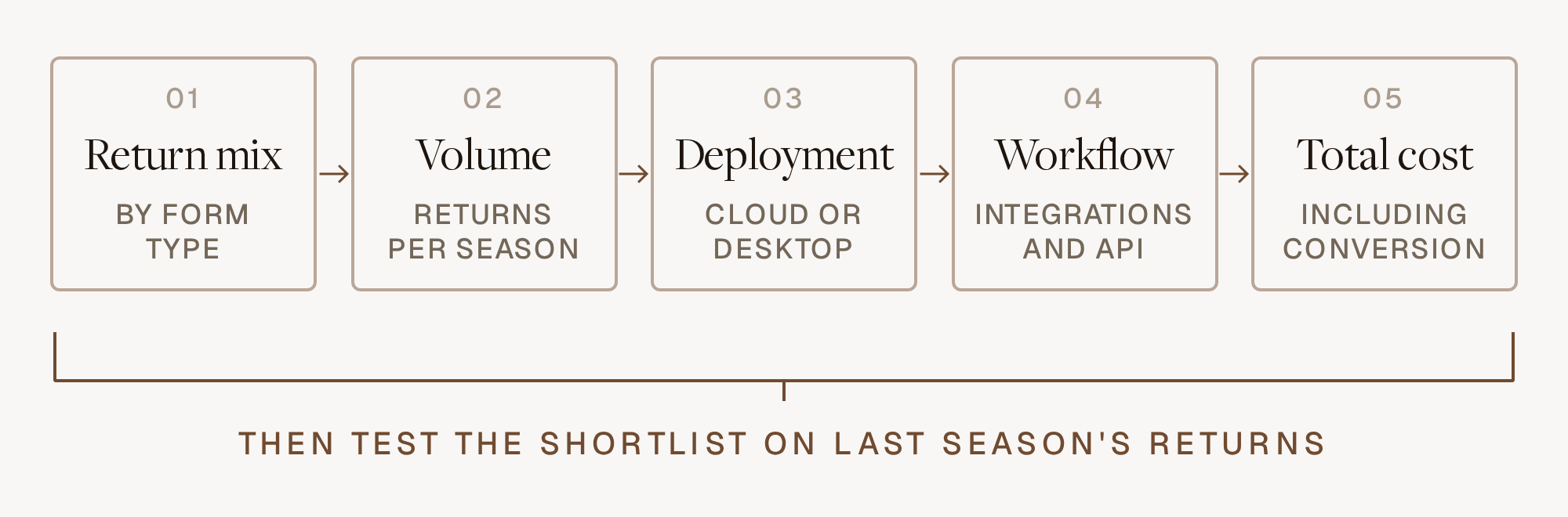
- Return mix. Count last season's returns by type: 1040, 1065 with K-1, 1120, 1120-S, 1041 and 990. Then count hours, because 400 partnership returns can take more of the season than 2,000 individual ones. The 1041s, 990s and multistate returns are where coverage gaps show up.
- Volume and peaks. Look at your peak week, not your annual total. Ask how each package handles several people in one return and batch e-file in the week before March 15. Per-return pricing that looks cheap at 500 returns may not be at 5,000.
- Deployment. Cloud packages (CCH Axcess Tax, ProConnect Tax, GoSystem Tax RS) take servers and updates off your plate. Desktop packages (UltraTax CS, Lacerte, Drake Tax) run on your own network or through hosting, and Drake also sells a browser version. Either way, ask where client data is stored and how it is protected; the IRS sets out the safeguards it expects from tax professionals in Publication 4557, Safeguarding Taxpayer Data.
- Workflow and integrations. List every system that touches a return: practice management, document storage, client portal, e-signature, bookkeeping. Ask which have a supported integration or API and which mean re-keying. Importing data and integration drew the most dissatisfaction in the survey, so push hardest here.
- Total cost, including conversion and people. The license or per-return fee is the visible part. Add hosting, modules, state fees, conversion, training and the slower first season while staff learn new screens. Count staff familiarity too: a package your senior preparers already know is worth a lot in March.
Then run the test. Convert a sample of last season's clients into each finalist and have preparers redo ten returns of each type you file. Time them, note where they got stuck, and ask each vendor for references from firms at your volume. That is the most reliable answer to which is the best tax software for tax preparers at your firm.
When should a firm switch tax software?
Decide by early fall, convert after the October 15 extension deadline, and train in November and December, so nobody learns new screens in February.
Plan the conversion as its own project. Intuit and Drake both run prior-year data conversion programs, and Thomson Reuters offers data migration help for new customers. What carries over varies by source package and return type, so ask exactly what does: client data, prior-year balances, carryforwards, depreciation schedules, and anything your team has customized. Keep access to the old package for prior-year lookups and amended returns, and go live with simpler individual returns before entities. Our busy season accounting playbook covers why every tooling decision belongs before December.
Where does an AI layer fit on top of professional tax software?
On top of whichever package a firm picks. The tax software stays the system of record for calculations, diagnostics and e-file, and the AI layer does the document reading, data entry and first-pass review around it. So a firm doesn't have to change tax software to fix importing data and integration, the two areas survey respondents rated lowest.
Filed does AI review and prep for mid-sized and high-volume firms. It works with CCH Axcess, Lacerte, Drake, ProConnect and GoSystem Tax RS, across 1040, 1065 with K-1, 1120, 1120-S, 1041 and 990 returns. Filed Prep reads the client's documents and prepares the return in the firm's own tax software. In CCH Axcess, Lacerte, Drake and ProConnect, it has 100% form coverage across supported return types and completes data entry in under 3 minutes per return. Filed Reviewer checks the draft return against the source documents line by line and hands the reviewer a leadsheet where every issue is ranked and every number traces to its source; firms using it see 64% shorter review cycles. Prowork, a sidebar inside the tax software, Excel and Outlook, helps preparers prepare and review where they already work.
Because Filed connects to CCH Axcess, Lacerte, Drake, ProConnect and GoSystem Tax RS (the full list is on Filed's integrations page, and this guide to what Filed connects to explains read and write access), a firm on any of those five can add Filed without switching, and keep Filed if it moves between them later. The CPA still makes the judgment calls and signs the return.
Frequently asked questions
What tax software do most CPA firms use?
In the 2026 Tax Adviser and Journal of Accountancy survey of 1,808 AICPA members, the four most-used packages were UltraTax CS (22.3%), Lacerte (16.7%), Drake Tax (14.3%) and CCH Axcess Tax (13.8%). ProConnect Tax, just outside the seven most-used, reached 4.4%.
Is cloud or desktop tax software better for a mid-sized firm?
Neither is better in general. Cloud packages remove servers and make remote review easier; desktop packages can be hosted for much of the same benefit, and staff familiarity counts. Decide on workflow and integrations first, then pick the deployment that serves them.
How long does it take to switch professional tax software?
Plan on one full off-season. Choose by early fall, convert after October 15, train in November and December, and go live in January with simpler returns first. Expect the first busy season on a new package to run slower than the one before it.
Which professional tax software does Filed work with?
Filed works with CCH Axcess, Lacerte, Drake, ProConnect and GoSystem Tax RS, across 1040, 1065 with K-1, 1120, 1120-S, 1041 and 990 returns. Filed reads the documents and prepares the return inside the package the firm already uses, so choosing or changing tax software doesn't lock a firm out. Filed is SOC 2 Type II and ISO 27001 certified.
If you are re-evaluating your tax software this fall and want to see how Filed works with the package you have, or the one you are considering, book a demo.
Subscribe to our newsletter
Explore our latest insights
Discover valuable articles to enhance your knowledge.