
Ask about any client, or all of them.
Analyst answers questions across your firm's whole client base, from the documents your clients sent. Ask who is still missing a K-1, who will owe or how a new rule hits your book, and get the answer as a table you can export. Tax research comes back with the sources attached.
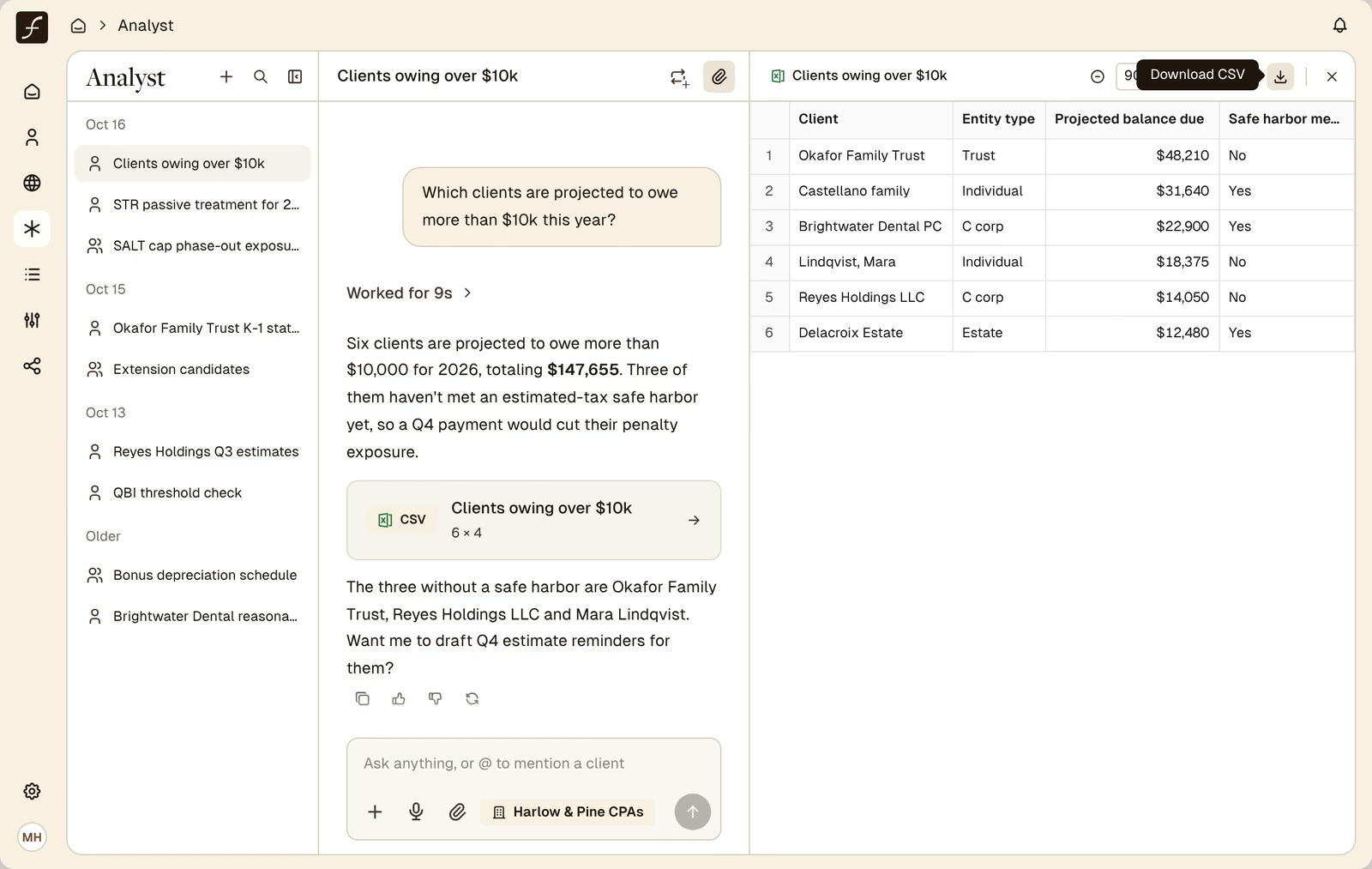
One question across every client, not one client at a time.
Current-year rules, linked to the source.
Tables, spreadsheets and documents to download or save.
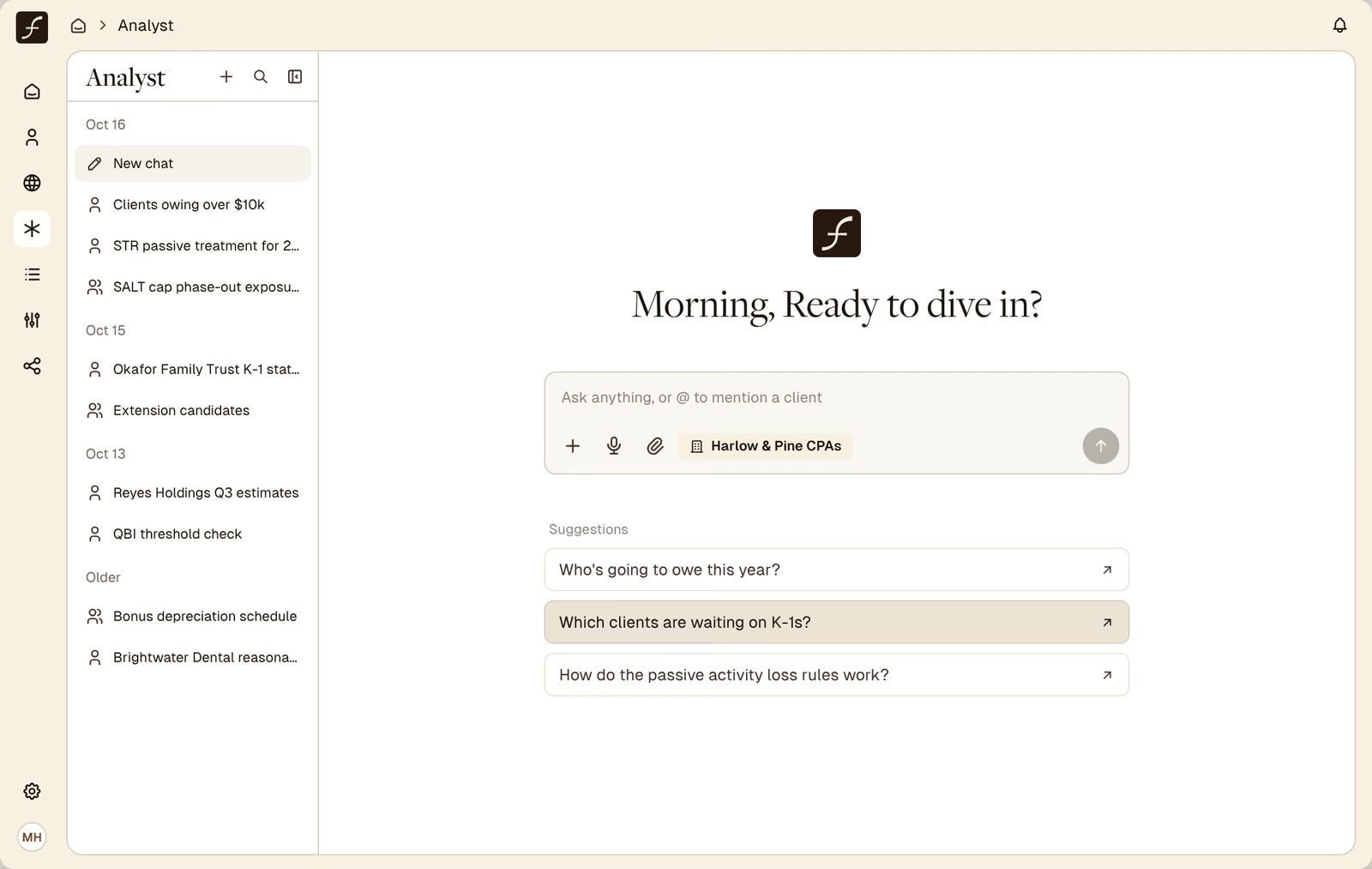
Ask about your whole book, in plain English.
Every client Filed processes adds to a firm-wide record of their tax facts: entity type, state, income, K-1s, rentals, estimated payments and more. Analyst queries that record directly, so a question that used to take a report, a spreadsheet and an afternoon takes one message.
- Who is missing what. Which clients still owe you documents, and which documents.
- Who will owe. Projected balances due, underpayment exposure and who needs an estimated payment.
- Who to extend. Returns ready to file, and the ones still waiting on K-1s.
- Who changed. Big income jumps, new states and new entities, year over year.
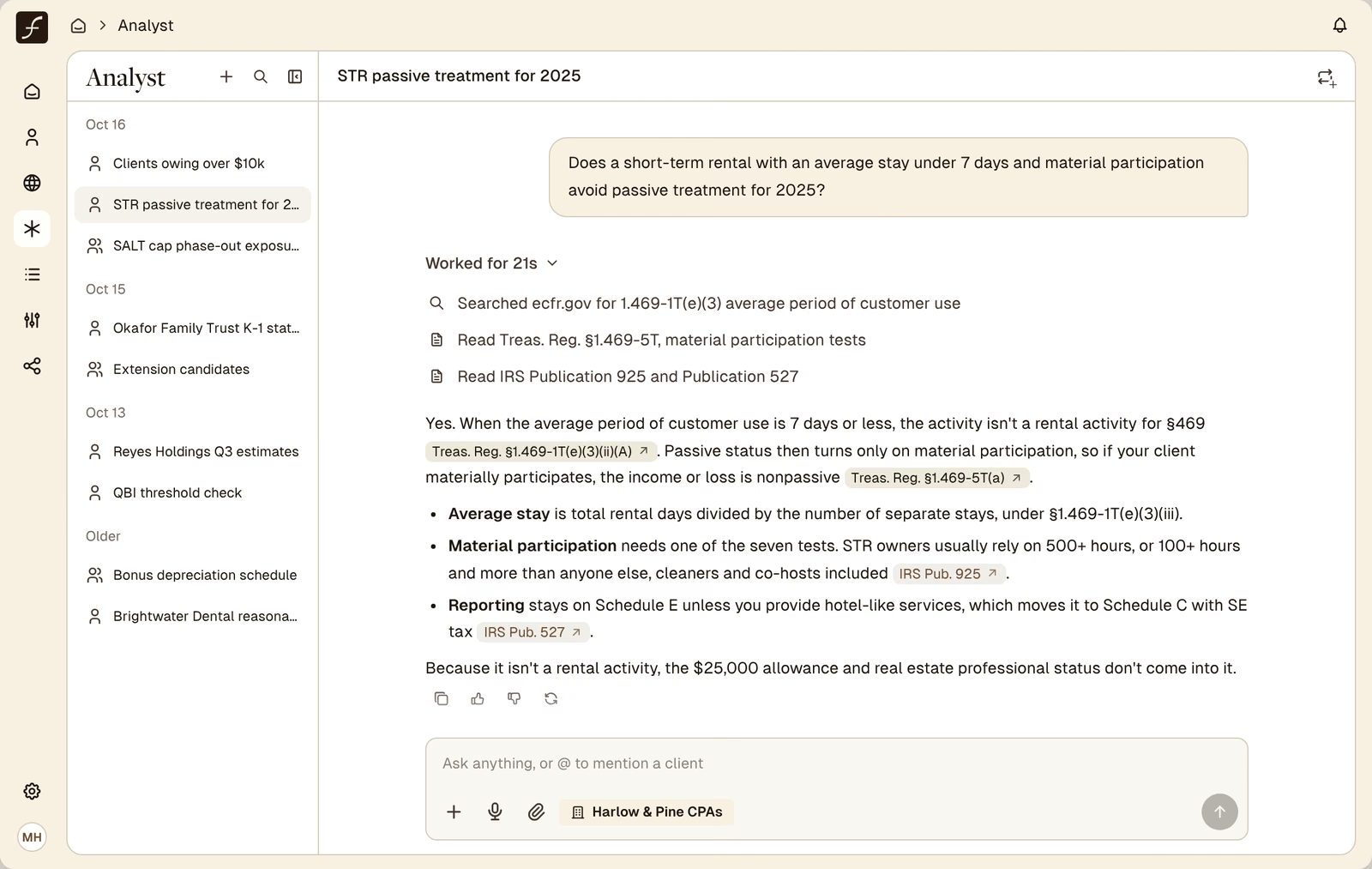
Tax research, with the sources attached.
Ask a technical question and Analyst searches live sources for the current-year answer instead of relying on what a model remembers. Thresholds, phase-outs, safe harbors and IRS guidance come back with citations you can open and check.
- Current-year figures. Rates, limits and phase-out ranges from live sources.
- Citations you can open. Answers link to the code section, regulation or IRS guidance behind them.
- Drafts to use. Ask for a memo, a client explanation or a statement to attach to the return.
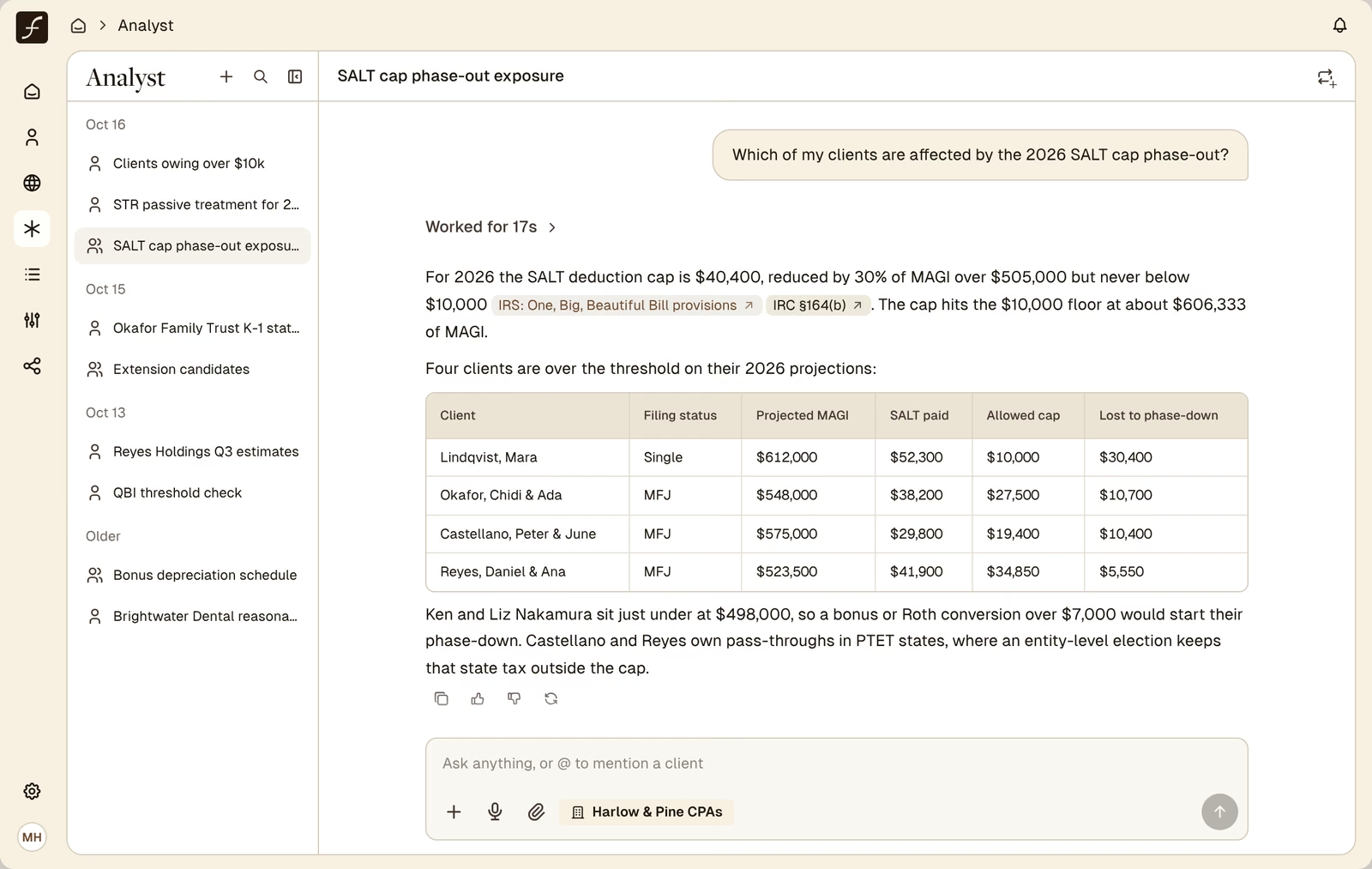
Research that already knows your clients.
A research tool stops at the rule. Analyst can check the rule against your book. Ask how a phase-out works, then ask which of your clients it hits, and get the list with the figures that put each client there.
- From rule to client list. One conversation. No export, no filter, no VLOOKUP.
- Owner groups and related entities. Compare K-1 income across a client's LLCs or add up QBI across entities, without setting up a consolidated client.
- Conversations worth having. The clients a new rule affects become a list your team can call.
Answers you can hand to someone.
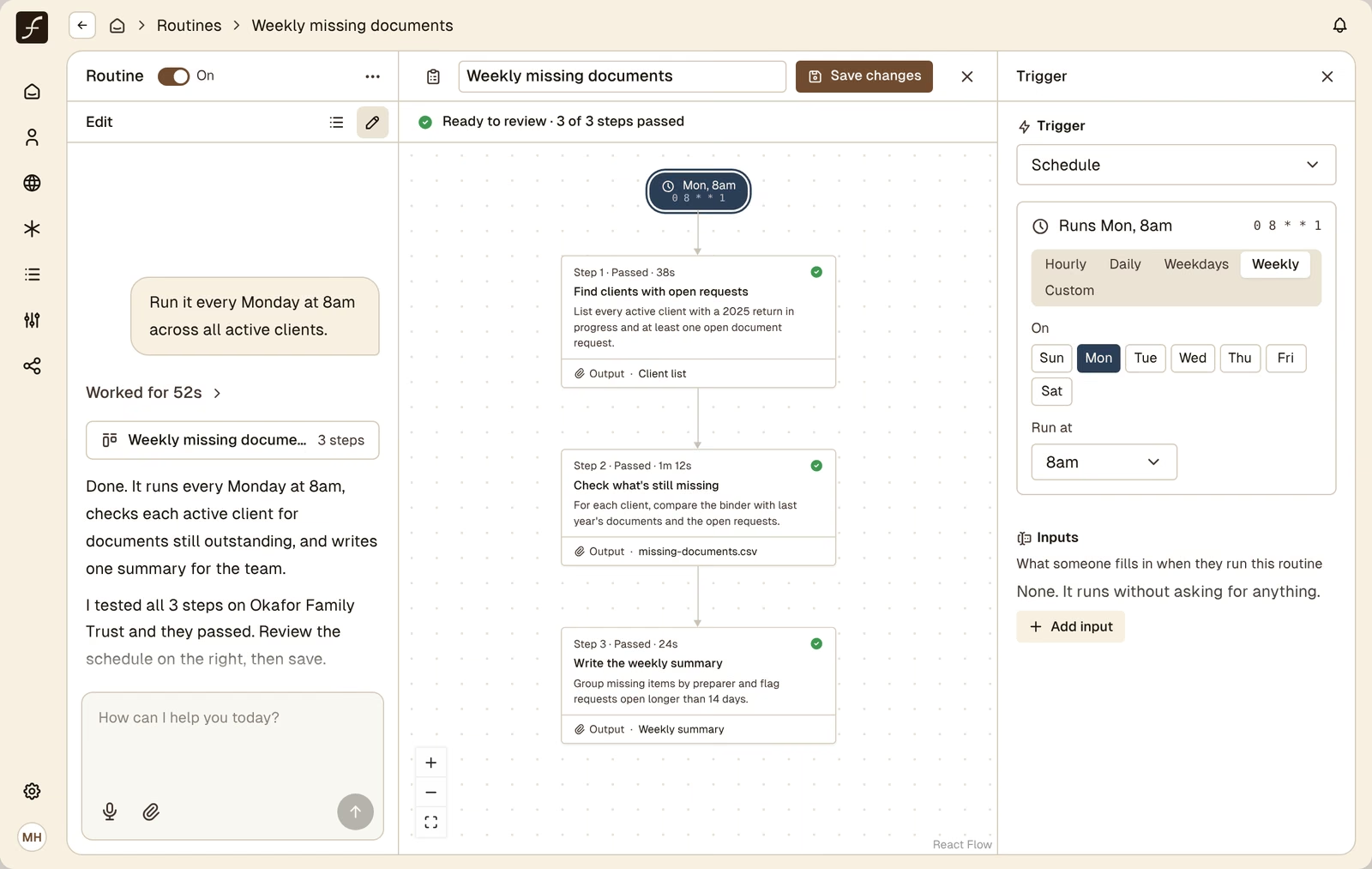
Ask for the answer in the shape you need: a table, a spreadsheet, a document or an interactive page. Save it to the client's binder or download it. When a question is worth asking every week, turn it into a routine your whole firm can use.
- Tables and spreadsheets. Download as CSV or a spreadsheet, ready to filter and share.
- Saved with the client. Keep an output in the binder of the client it's about.
- Templates. Save a format you like for yourself or for the whole firm.
- Routines. Turn any chat into a routine in one click. Run it on many clients at once, on a schedule or when a task changes status.
Answers from the tools you already use.
Connect your practice management, books and meeting notes, and Analyst answers from those too.
Double
Ask about clients, tasks and metrics in Double without leaving Filed.
Digits
Pull a P&L, balance sheet, trial balance or aging report for any period, query the ledger and compare quarters.
Ping
Ask what was discussed with a client. Analyst reads meeting transcripts, summaries and action items.
Shared routines
Routines are shared across your workspace, so one person's weekly report becomes the whole firm's.
Questions about Analyst.
Analyst is Filed's AI assistant for the whole firm. Other Filed tools work on one client at a time. Analyst works across all of them. It reads a firm-wide record built from each client's tax documents, so partners, managers and preparers can ask questions like which clients are missing documents, who will owe this year or who should go on extension, and get the answer as a table. Analyst also does tax research: it searches live sources for current-year rules, cites the code section, regulation or IRS guidance it relies on, and can check that rule against your clients. Answers can be downloaded as spreadsheets, saved to a client's binder, saved as templates or run on a schedule as routines. Analyst is included in every Filed plan.
Pipeline questions (who is missing documents, who is waiting on K-1s, which returns are ready to file), tax position questions (who will owe, who is at risk of an underpayment penalty, who had a big income change), client mix questions (entity types, states, AGI ranges, rentals, crypto, foreign activity) and tax research questions. You can @ mention a client to ask about one client, or leave it open to ask about all of them.
Answers about your clients come from the tax facts Filed extracts when it processes each client's documents, so they reflect each client as of their latest processing. Answers from connected tools like Digits and Double are pulled live when you ask. Tax research answers come from live web sources, with citations, so figures like phase-out ranges and safe harbor thresholds are current rather than remembered.
For a lot of everyday research, firms find it can. Analyst answers with citations to primary sources such as the Internal Revenue Code, Treasury regulations and IRS guidance, using current-year figures. It does not include the proprietary treatise libraries some research services license, so firms that rely on those for deep work may keep them. What a standalone research tool can't do is apply the answer to your clients, and Analyst can.
Chat in the binder works on one client and reads that client's documents page by page, so it can answer "Does box 4 match 6.2% of wages?" Analyst works across every client at once. Use the binder for page-level questions and Analyst for questions about your book.
Yes. Ask about an owner group and Analyst can compare K-1 income across their LLCs, add up QBI across entities or track pass-through losses, even when each entity is set up as a separate client in Filed.
Tables, CSV files, spreadsheets, documents and interactive pages. You can download them or save them to a client's binder and save a format as a template for yourself or your firm. Any chat can become a routine: Analyst drafts the steps from the conversation, and you can run it on a set of clients, on a daily or weekly schedule or when a task changes status. Routines are shared with everyone in your workspace.
When connected, Analyst can read clients, tasks and metrics in Double, pull financial statements and ledger data from Digits, and read meeting transcripts and action items from Ping. Filed works with CCH Axcess, Lacerte, Drake and ProConnect, so your team keeps its tax software.
Yes. Analyst is part of every Filed plan, not an add-on, and every user at your firm can use it.
No. Your data is never used to train models shared with other firms, and each firm's data is kept separate from every other firm's. Filed is SOC 2 Type II audited and ISO 27001 certified, with reports available under NDA.