
Share this post
K-1 software: how tax firms process K-1s at volume
K-1 software reads the Schedules K-1 your clients receive from partnerships, S corporations, estates and trusts, including the footnotes and supplemental statements behind the face page. It extracts every box and code, maps each one to the right input in your tax software, ties each figure to its source page and flags what changed from last year. Basis, at-risk, passive activity and election calls stay with the preparer.
A Schedule K-1 is the form a pass-through entity uses to report each owner's share of its income, deductions and credits. Partnerships issue it with Form 1065, S corporations with Form 1120-S, and estates and trusts with Form 1041. Partners and S corporation shareholders owe tax on their share whether or not the entity paid out any cash. This piece is about the K-1s a firm receives on behalf of its clients. If you prepare the partnership return that issues them, our post on whether AI can automate partnership tax returns covers that side.
Why are K-1s so hard to process at volume?
Because one client can receive dozens of them, they arrive late, and the numbers that change the return often sit in the attachments rather than on the face page. A W-2 is one page with fixed boxes. A fund K-1 package is a face page, a stack of statements and sometimes a state K-1 and a Schedule K-3.
How do firms process K-1s today?
Mostly by hand, in a sequence that looks much the same at many firms: log the K-1, key the face page, read the statements, enter what they change and have a reviewer tie it all back to the PDF.
K-1s come in through the portal, by email and by mail, often weeks apart. Someone checks them against last year's return to see what is still missing. A preparer opens the K-1 input screen in the tax software, keys the face page, then reads the statements for what changes the answer: the activity breakdown, the 199A detail, the state schedule, the at-risk and passive activity statements. Basis and suspended losses get updated in a workpaper. Then a reviewer ticks every entered figure against the source.
For a client with dozens of fund K-1s, that sequence can take up much of the time spent on the return. Some extraction tools read the face page well and skip the statements, so the preparer re-reads the attachments anyway. Our buyer's guide to AI tax software for document processing covers how to tell the two kinds of tool apart.
Where do K-1 errors come from?
The expensive K-1 errors usually come from what surrounds the numbers rather than the arithmetic. A wrong code still produces a return that calculates, which is why these errors reach review.
The table shows where some common partnership K-1 items go on a client's Form 1040 under the 2025 partner's instructions. It is a sample, not the full code list.
What should K-1 software do?
Good K-1 software follows the path a careful preparer already takes, from receipt to review, and leaves a trail at every step so a reviewer can check any number in one click.
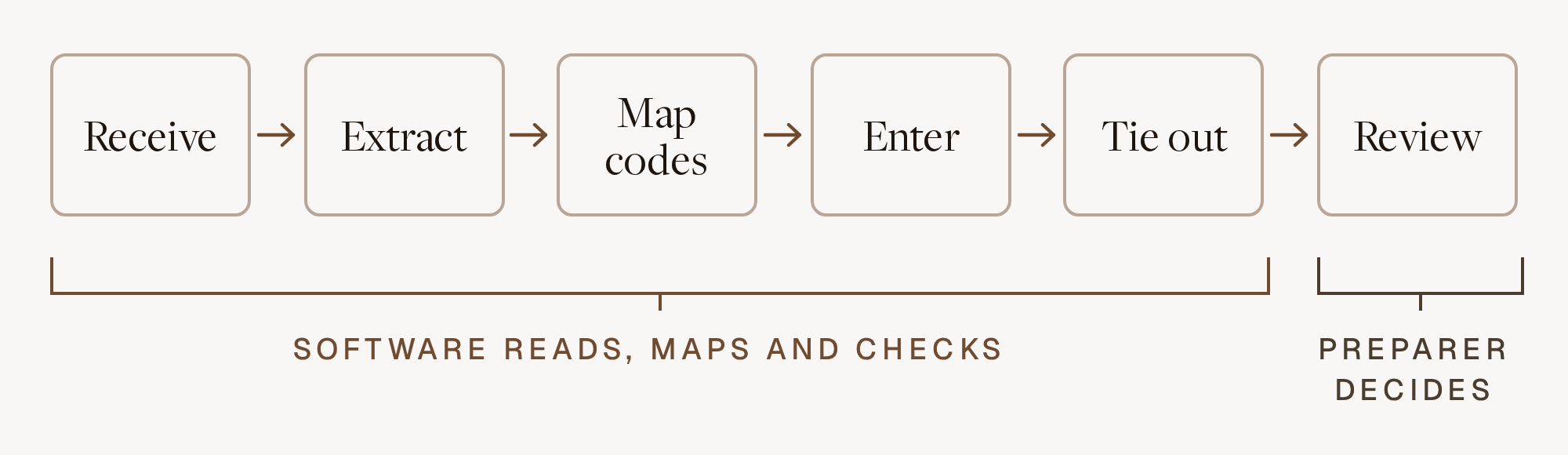
K-1 automation that stops at the face page moves the work rather than removing it.
What still needs a preparer's judgment?
Anything that depends on facts the K-1 doesn't contain. The partner's instructions state that the amounts in boxes 1 through 21 are reported without reference to the basis, at-risk, passive activity and excess business loss limitations, and that applying those limits is the partner's responsibility.
Software can put every one of these in front of the preparer early. It can't decide them.
How does Filed handle K-1s?
Filed Prep reads each K-1 with its footnotes, supplemental statements and state schedules, and prepares the return in CCH Axcess, UltraTax, Lacerte, Drake, ProConnect or GoSystem Tax RS. Every figure Filed Prep enters links to the page and box it came from, and values Filed Prep isn't certain of are flagged with the source attached instead of guessed. Filed's AI tax preparation covers 1040, 1065 with K-1, 1120, 1120-S, 1041 and 990 returns, so K-1s received by individuals, partnerships, corporations and trusts go through the same process.
Filed Reviewer then checks the return line by line against the K-1s and the rest of the binder, and gives the reviewer a ranked list of issues, each tied to its source page. Filed builds protocols from the firm's preferences and rules, such as how the team handles a fund that reports 199A detail in an unusual statement layout, and applies them on every return. Firms using Filed report 64% shorter review cycles. Filed does the reading and checking so your preparers and reviewers can spend their time on basis, passive activity and election calls.
Frequently asked questions
What is a K-1 tax form?
A Schedule K-1 reports an owner's share of a pass-through entity's income, deductions, credits and other items. Partnerships issue it to partners with Form 1065, S corporations to shareholders with Form 1120-S, and estates and trusts to beneficiaries with Form 1041. The owner reports the amounts on their own return, and generally doesn't attach the K-1 itself.
Why do K-1s arrive so late?
A partnership has to furnish K-1s by the due date of its return, and an extension moves that to September 15 for a calendar-year partnership. Funds also wait on K-1s from the partnerships they invest in, so delays stack up through each tier.
Can K-1 software read footnotes and K-3s?
Good K-1 software can, but check it on your own documents. Run a real fund package and see whether the 199A statement comes through by activity, whether STMT items are flagged, and whether the Schedule K-3 is recognized as a separate schedule.
Should a preparer change a K-1 figure that looks wrong?
No. The IRS instructions for partnership, S corporation and estate or trust K-1s all tell the recipient not to change items on their copy and to ask the issuer for a corrected K-1. If the client reports an item differently from the entity, Form 8082 may be required, and leaving it off can bring an accuracy-related penalty.
Does Filed work with K-1s in my tax software?
Yes. Filed reads K-1s from partnerships, S corporations, estates and trusts, including footnotes and statements, and prepares the return in CCH Axcess, UltraTax, Lacerte, Drake, ProConnect or GoSystem Tax RS. Every figure traces to its source page. Filed is SOC 2 Type II, with ISO 27001 certification in progress.
If you want to see how Filed handles your clients' K-1s, book a demo and bring the thickest fund package you have.
Subscribe to our newsletter
Explore our latest insights
Discover valuable articles to enhance your knowledge.