
Share this post
Tax workflow automation that follows your firm's rules
Tax workflow automation is software that moves a return through intake, organizing, prep, review, sign-off and delivery with less manual handling at each step. Firms that get value from it automate the repetitive checks first, usually document intake and the source-to-return comparison in review, and they make sure the automation applies their own rules and review standards. Generic rules produce generic returns, and reviewers end up fixing the same things every season.
Most firms already have a tax preparation workflow. It lives in a practice management board, a review checklist someone last updated years ago, and the heads of three senior reviewers. The checklist says "tie out all 1099s." The reviewers know that at this firm it also means the payer TIN has to match the source document, state withholding goes on the state screen, and any client with rental property gets a depreciation schedule tied to last year's return.
That second layer is what automation usually misses, and it's what generates kickbacks.
What does tax workflow automation cover?
Tax workflow automation covers two layers, and most confusion comes from mixing them up. The first layer tracks the work: who has the return, what stage it's in, what's waiting on the client. The second layer does the work: reading documents, entering data, comparing the return against the source, building workpapers.
Practice management tools handle the first layer well. They move a job from "waiting on docs" to "in prep" to "in review." They don't read a K-1 or notice that the cost basis on a brokerage statement never made it onto Form 8949. The second layer is where the hours go, and it's where the firm's own rules matter most.
A useful test: if a step needs someone to open a source document, it belongs to the second layer.
What are the stages of a tax preparation workflow?
A tax preparation workflow has six stages at most firms: intake, organize, prep, review, sign-off and delivery. Each has a manual version and an automatable version, and they don't carry equal weight.
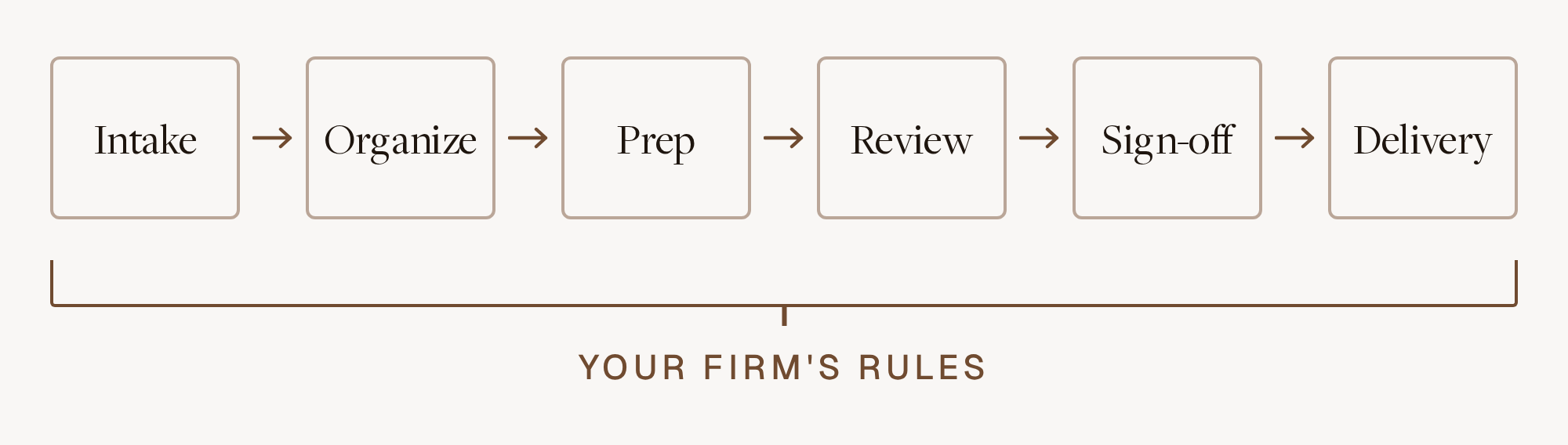
- Intake. The client uploads documents through a portal or email. Manually, an admin chases missing items and checks the pile against last year's list. Automated, software compares what arrived against the prior-year return and flags what's missing, like the K-1 that came last year and not this year.
- Organize. Documents get classified, split, rotated and bound. Manually, someone builds the binder by hand. Almost all of this can be automated, because classification and splitting are pattern work.
- Prep. Data moves from source documents into the tax software. Manually, a preparer keys W-2s, 1099s and K-1s line by line. Automated, software extracts and enters the data, and the preparer handles what the documents don't settle: elections, carryovers, anything that depends on a conversation with the client.
- Review. A senior compares the return to the source documents and the firm's standards. Manually, the reviewer re-ties numbers the preparer already tied. Automated, software runs the line-by-line comparison and the firm's standing checks, and the reviewer keeps the questions that need judgment.
- Sign-off. The partner or reviewer takes responsibility for the return. This stays human. Automation shortens it by handing over a return with a cited list of what was checked and what's still open.
- Delivery. Filing, e-file authorization, client copies, invoicing. Mostly notifications and reminders, which is practice management territory.
Which steps should a firm automate first?
Automate the steps where your people repeat the same check on every return and the answer sits in a document. For most firms that means review first, then organizing and intake, then prep data entry.
Review goes first because it's the busy-season bottleneck: fewer people can do it, and reviewer hours are the firm's most expensive. Automating the source-to-return comparison also doesn't require preparers to change how they work. Filed Reviewer compares source documents against the draft return line by line and gives the reviewer a cited list of issues, so review starts at the problems instead of at page one. Firms using Filed have seen 64% shorter review cycles and 42 minutes saved per return.
Organizing and intake come next because they feed everything downstream.
Prep automation follows. It saves the most keystrokes, but it's also where a firm has to trust the output most, so it's easier to adopt once automated review is catching errors. Workpapers can run in parallel; see our guide to automating tax workpapers with AI.
Leave the judgment work with people: planning conversations, positions that need support, unusual transactions, and anything where the answer depends on what the client said in March. Automation should hand those to a person with the evidence attached.
Why does automation need to follow your firm's rules?
The review standard your partners sign against is your firm's standard, and generic automation doesn't know it. Every firm has rules that aren't in the tax code: how to present rental activity, which clients always get a state estimate worksheet, how to label an amended return in the binder, when a year-over-year swing needs a note.
Circular 230 puts this responsibility on the firm. Section 10.36 of Circular 230 says the people with principal authority over a firm's tax practice must take reasonable steps to make sure the firm has adequate procedures in effect for everyone who works there. Software that ignores your procedures creates a second standard the reviewer has to police.
The usual failure: a preparer repeats a mistake a reviewer corrected last week, the reviewer corrects it again, and next season a new hire makes it for the first time. The rule lived in someone's memory, and memory doesn't scale past a handful of people.
AI tools have their own version of this. Many "learn" by storing examples or adjusting a prompt, which holds until the context shifts and the fix fades. For a firm's rules to hold across 3,000 returns and several seasons of staff turnover, the correction has to become part of how the software runs.
How do taught skills work in Prowork?
In Prowork, you correct the software once in plain language and it writes the fix into code, so the same mistake doesn't come back. Filed calls these taught skills.
Prowork is a desktop app and Excel add-in that reviews inline, in a panel beside the tax software. As the preparer opens a form, Prowork shows the client's source data next to it and flags errors on that form while the preparer is still working. How the data got in doesn't matter: a hand-typed entry gets checked the same way as an imported one.
When Prowork gets something wrong, or when your firm does something its own way, the preparer or reviewer says so in ordinary words. Two examples:
- "The payer TIN on this 1099-NEC is wrong. Going forward, cross-reference the TIN against the source document."
- "This client has six 1099-NECs. Total the gross receipts and put them on the Schedule C."
Prowork's agent turns that instruction into code that runs on every applicable return from then on. The correction is hard-coded, so it doesn't depend on a model remembering it. Filed ships about 35 pre-built skills for checks firms commonly want, and firms add their own on top. Over a season, the skill library becomes an executable copy of the review standards that used to live in three senior reviewers' heads.
The CPA still signs off. Taught skills move the firm's routine standards into the software, which frees reviewer attention for the questions that need a professional.
How is practice management software different from tax work automation?
Practice management software tracks the tax workflow, while tax work automation performs the steps inside it. Most firms need both, and the two should connect.
Accounting firm workflow software handles job status, deadlines, client requests and staff capacity. It knows a return is "in review." It doesn't know the return is missing a K-1.
Filed integrates with practice management, portal and hosting platforms including Karbon, Canopy, Truss, Financial Cents and Verito, and works with CCH Axcess, UltraTax, Lacerte, Drake and ProConnect. Status stays in the practice management tool. The document reading, prep and review happen in Filed.
Ask each vendor which layer it covers. A good board with no document intelligence makes the queue visible without making it shorter.
What should you check before automating any stage?
Check three things: where client data goes, whether every output traces to a source, and whether the tool covers your actual return mix.
- Data handling. The FTC Safeguards Rule requires tax preparers to keep a written information security plan, and IRS Publication 4557 walks through what that plan needs, including multi-factor authentication. Any tool that touches taxpayer data belongs in that plan. Filed is SOC 2 compliant, with ISO 27001 certification in progress.
- Traceability. Every number and flag should link back to the document it came from. If a reviewer can't verify an output quickly, they'll redo the work and the time savings disappear.
- Coverage. Automation that only handles 1040s leaves your senior people doing entity returns by hand. Filed reads the documents and prepares the return across 1040, 1065 with K-1, 1120, 1120-S, 1041 and 990.
Then pilot on a batch of last season's returns, where you already know the right answer.
Frequently asked questions
What is tax workflow automation?
Tax workflow automation is software that handles repeatable steps in the tax preparation workflow: document intake and organizing, data entry, source-to-return review and workpapers. It works best when it applies the firm's own review rules and a CPA still signs off on every return.
Which part of the tax workflow should we automate first?
Start with review. It's the busy-season bottleneck, reviewer time costs the most, and automating the source-to-return comparison doesn't change how preparers work. Intake, organizing and prep data entry come after.
Is practice management software the same as tax workflow automation?
No. Practice management software tracks who has each return and what stage it's in. Tax workflow automation reads documents and does the work inside those stages. Most firms use both and connect them.
How does Filed learn a firm's rules?
Filed's Prowork uses taught skills. A preparer or reviewer corrects Prowork once in plain language, and Prowork's agent writes that correction into code that runs on every applicable return, so the fix is permanent. Filed also ships about 35 pre-built skills as a starting point.
If your reviewers correct the same things every season, that's where tax workflow automation should start. Book a demo and bring a return your team kicked back last year.
Subscribe to our newsletter
Explore our latest insights
Discover valuable articles to enhance your knowledge.